A customer sees your post and asks: how much? Do you deliver to my area? Is this a real shop? Will it look like the photo? Each question is one more message before she pays, and some buyers don’t ask at all: they move on to the next seller. This planner turns those questions into your posts.
It has 90 posts already planned, taken from 100 ideas in six kinds: how to order, proof that your shop is real, the truth about the product (real size, real colour), what’s new, packing and delivery, and tips. Each idea says which question it answers for the customer. Three of them, exactly as they are in the file:
"Delivery fees by area: write a short table (area, fee, how many days) and post a photo of it. Pin it next to your How to order post, and put it on your Status every Monday."
"Film your shop entrance from the street: the building, the floor, the shop number and the nearest landmark. Write the same address in the caption."
"Real colour: the same item outside in daylight and inside under your shop light, side by side. Say which one is closer to the truth."
Your WhatsApp Status has its own place: some posts are made for it, like today’s stock with the price on each photo, and the others can go on it too.
You choose the days you post. Type a start date, choose Yes on Monday, Wednesday and Friday for example, and the 90 posts get their dates. Once you’ve posted, you type the day in "Posted on" and that post keeps its date. If you post late or stop for two weeks, the posts not done yet move after your latest one, so nothing piles up behind you.
You type your delivery fees, how people pay, where to find you and how to order once. The file joins them into one order block, and most of the 30 caption templates already end with it, with your shop name in. You fill the blanks, price first. No template says "DM for price", invents stock that’s running out, or ends with "tell me in the comments". Each one comes with an example filled in for a shoe seller, like this one:
"Packing for Wanjiku in Rongai: black office pumps, size 39, KES 2,800. Checked, wrapped, and out with the rider at 2 pm."
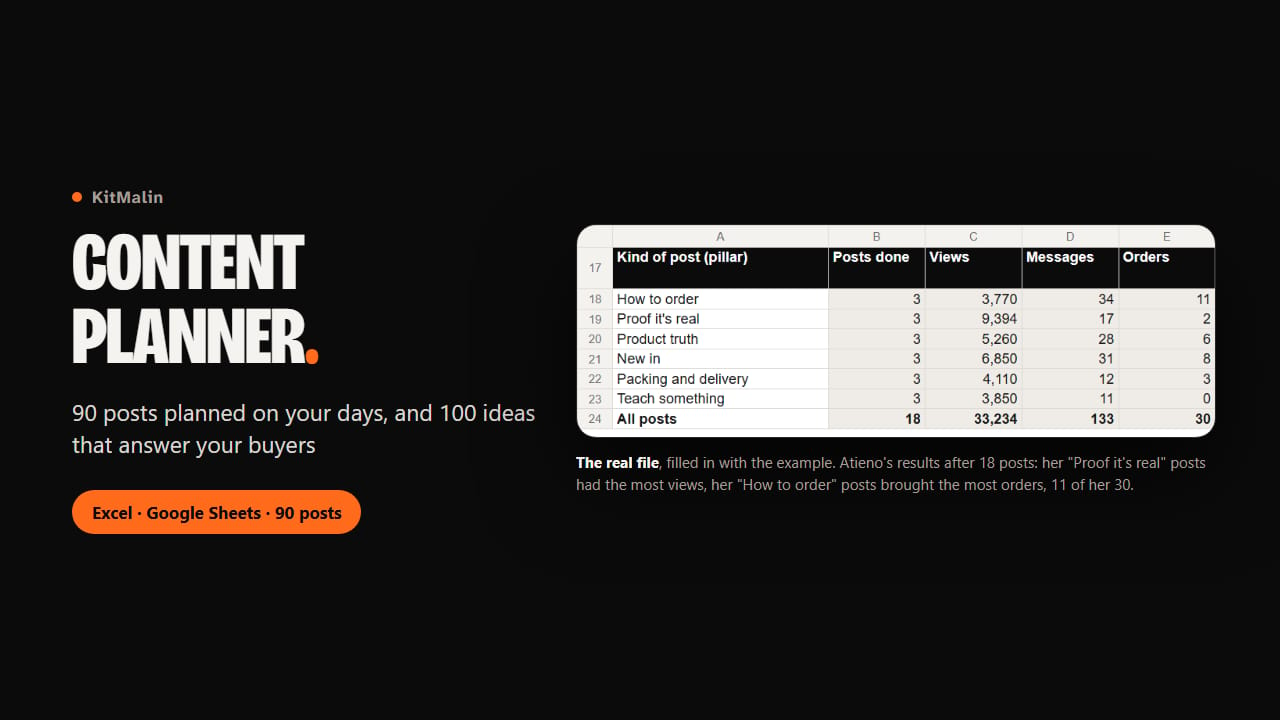
The day after a post, you add its views, the messages it brought and the orders. Results adds them up by kind of post, format and platform, so you see what sells for you. In the example file, Atieno, a made-up shoe seller in Nairobi, has done 18 posts: her shop-entrance video got the most views (6,420) and one order, while her three How to order posts got the fewest views and brought 11 of her 30 orders.
The file only uses functions that exist in both Excel 2016 and Google Sheets. Our automatic tests recalculate every figure of the example, and we opened it in Google Sheets: every date and total matched, and moving the start date left the published posts where they were. We haven’t opened it in Excel ourselves yet.
What you get
- Content Planner.xlsx: your planner, with 90 posts already planned, 100 ideas, 30 caption templates and a Results tab
- Content Planner (example).xlsx: the same file used for six weeks by a made-up shoe seller in Nairobi, with her dates, notes and results
- Start here.pdf: a guide with real pictures of the file, step by step
- In the file: Settings for your days and order details, a Calendar with date, idea, format, platform, time and results, Captions, Results, and Post ideas with the question each idea answers