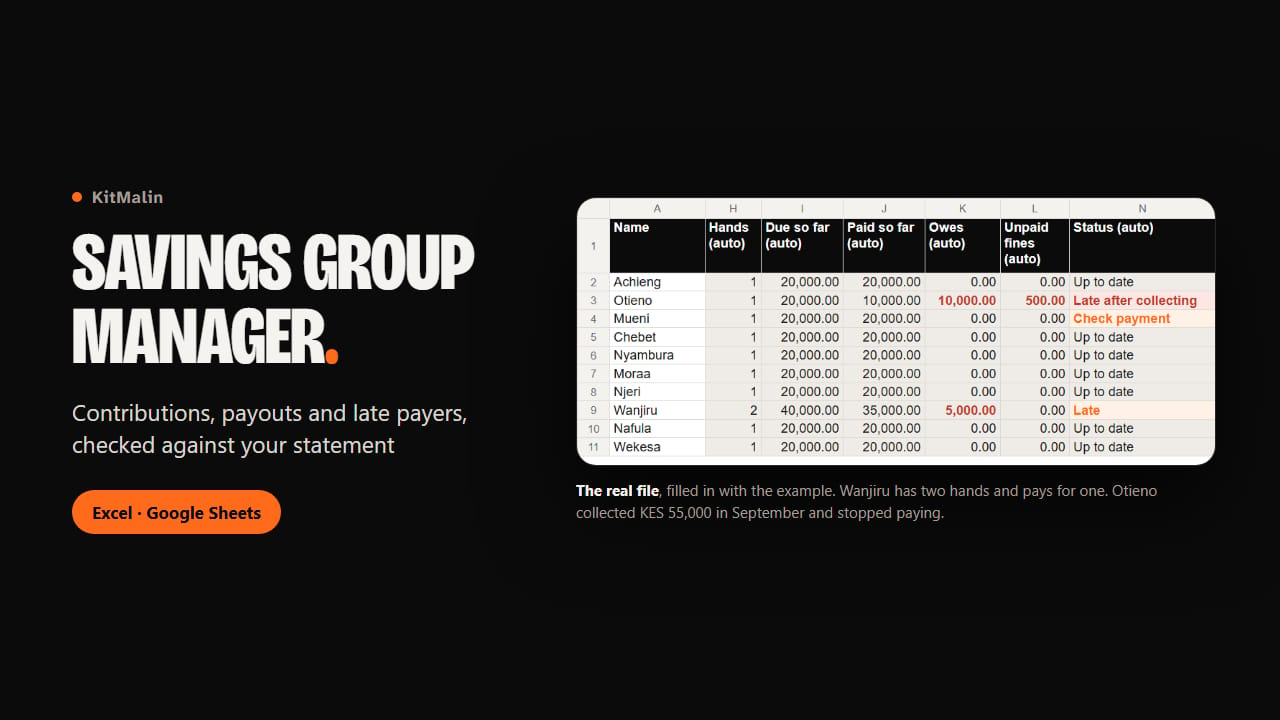
You write one line per member, choose who collects in each round, and add one line per payment. The file works out what each person should have paid by now, what they owe, and what every round has brought in.
Your cycle has already started? You don’t retype months of old payments: you type what each member has paid so far and what each past round collected, then record new payments from today.
A member with two hands appears twice in the order of turns and owes two contributions every round. In a notebook, someone who pays for only one hand looks paid up. Here they show Late, with the amount.
Members who stop paying after they have collected their pot are marked apart: "Late after collecting". They have nothing left to wait for, so they are the ones to chase first. Each member has a guarantor in the file.
Nobody is late on the day of the round: only from the next day, plus the days your group allows. Someone who joins after round 1 owes from the round they start.
Each payout has its line: the date, the amount sent, the M-Pesa or bank reference, and who confirmed they received it. A pot that went out incomplete shows "Paid out, short". Fines and other money (charges, welfare) have their own sheets.
Every payment has a Reference column for the transaction code. If the same code is typed twice, even a bank reference made only of digits, both lines say where the other one is, and the member shows "Check payment" instead of "Up to date" until you sort it out. That’s how you catch an old screenshot sent again as proof of payment.
Once a month, you type the balance shown on your statement. The file shows what should be in the account and the difference. In the example file, the difference is KES 5,000: exactly the November payment of a member whose "proof" was her October M-Pesa message sent again.
Group view shows names, payments, what each person owes and the order of turns, on 5 narrow columns and with no phone numbers. One screenshot on your phone, posted in your WhatsApp group, instead of sharing the whole file.
The example file is filled in for Mama Njeri, a made-up treasurer of a chama of 10 in Kayole, Nairobi, saving KES 5,000 a month. The guide explains each step with pictures taken from that file, with two short parts on who should collect last and what counts as proof of payment.
Rounds can be daily, weekly, every 2 weeks or monthly, in any currency. The file is made for Excel 2016 or later and Google Sheets: it only uses functions that both have.
What you get
- Savings Group Manager.xlsx: the empty file, for your group
- Savings Group Manager (example).xlsx: the same file filled in for a made-up chama in Nairobi, with figures that add up
- Start here.pdf: the guide, with real pictures of the example file
- In the file: Settings, Members (with guarantors), Rounds (order of turns and payouts), Contributions, Fines, Other money, a Dashboard with the statement check, and a Group view to share