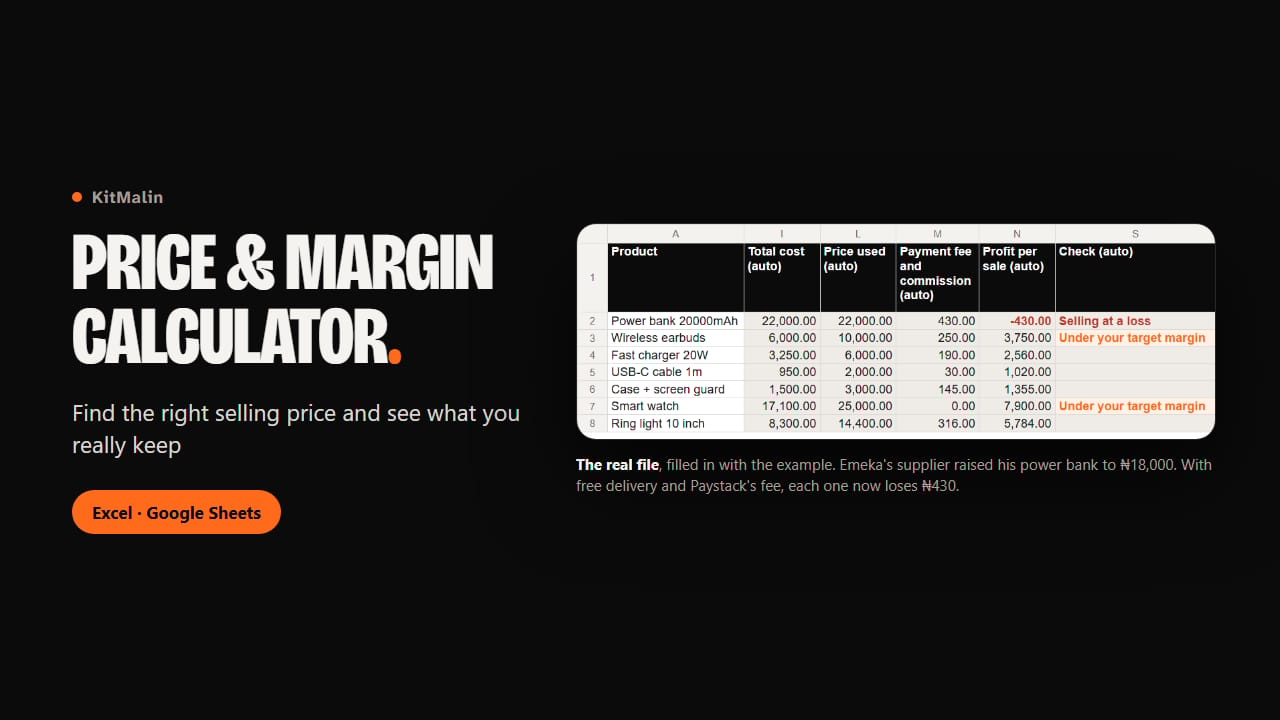
Emeka sells power banks at ₦22,000 from Computer Village, Ikeja. His supplier has just gone from ₦14,000 to ₦18,000, he offers free delivery, and Paystack takes ₦430 on each sale: every power bank he sells now loses ₦430. Emeka is made up, but his file comes with yours, with figures that add up, and it shows the kind of loss this calculator is built to catch before the month is over.
The file prices each product from everything one sale costs you: the item, the next restock if your supplier has raised his price, transport, packaging, the delivery you pay for, and the payment fee. It gives the lowest price that keeps the margin you want, rounded up to the next ₦50 so you never fall below it. Type the price you really charge, and you see what each sale leaves you.
Margin and markup sit side by side, because they are easy to mix up: adding 50% on top of your cost gives a 33% margin, not 50%. Settings has a small table that turns one into the other.
Payment fees are worked out the way providers charge them, not as one percentage. Paystack Nigeria takes 1.5% plus ₦100, skips the ₦100 under ₦2,500, and stops at ₦2,000. An M-Pesa till is free up to KES 500, then takes 0.55%, never more than KES 200. The file comes with these lines, plus Paystack Ghana and Kenya, a POS terminal in Nigeria, transfers and cash, checked on 12 November 2026 with their source. You check yours, and add the ones you use.
Quick check prices one product at a time, from top to bottom on two columns, so it fits a phone screen. Type what the item costs you and how the customer pays, and you see the price, the fee and what you keep before you answer a customer.
Before a promotion, the Discounts sheet shows what one sale leaves you after the discount, and how many sales you need to earn the same: at 20% off, Emeka would have to sell 22 pairs of earbuds to earn what 10 bring today. Summary adds up all your products with the sales you expect, takes off your rent, staff, data and ads, and tells you around which day of the month they are paid for.
You get the empty file, the example file and a guide with pictures of each step taken from the example. We opened the example in Google Sheets: its figures match our tests. The file is also built for Excel 2016 or later, using only functions both have, but we haven’t opened it in Excel ourselves yet.
What you get
- Price & Margin Calculator.xlsx: the empty file, with room for 300 products
- Price & Margin Calculator (example).xlsx: the same file filled in for a made-up phone accessories seller in Lagos, with 7 products and his Black Friday plan
- Start here.pdf: a guide with real pictures of the file, one step at a time
- In the file: a Quick check sheet for one product at a time, your settings with a markup and margin table, a Payment fees sheet with 8 ready-made lines, a Prices sheet with a "Fix" message on incomplete lines, a Discounts sheet, and a Summary of your month